You can audit a website for SEO without paying anything. The catch is that “free” means very different things from one tool to the next: some crawl your whole site, some check a single page, some allow one check a day, and some are a trial with a countdown. This guide covers ten SEO audit tools that are genuinely free, what each one really gives you, and how to combine them into a complete audit in an afternoon.
- Start here, whatever else you use: Google Search Console. It is the only free source of what Google actually indexed.
- Free crawl of your whole site: Ahrefs Webmaster Tools for verified sites, or Screaming Frog up to 500 URLs.
- A free plan with no time limit: Seobility, 100 pages per crawl.
- No account at all, with a PDF: Seomator, one page per run.
- Free and unlimited, if you can install it: Beam Us Up or LibreCrawl.
Need a client-ready report or the whole audit in one place? Daylytix is free to try for 7 days, no card.
Disclosure: Daylytix is our product. It is not free after its 7-day trial, so it is not in the list of ten. We mention it once, at the end, for readers who outgrow free tools.
What “free” really means: five limits to check
- Pages: a whole site, a page cap (100, 500, 5,000 credits) or a single URL per run.
- Sign-up and verification: some tools need an account; the search engines’ own tools and Ahrefs need you to prove you own the site, so they cannot audit a prospect’s or a competitor’s site.
- How often: one check a day, a monthly quota, or no limit.
- Report: whether you can download a PDF or only view results on screen.
- Time limit: a free plan you can keep, versus a trial that ends.
Every limit below comes from the tool’s own website, checked on 3 October 2026, and each section links to its source.
10 free SEO audit tools at a glance
| Tool | Type | What is free | Account / verification | Free PDF |
|---|---|---|---|---|
| Google Search Console | Search engine data | Everything | Account + verified site | No |
| Bing Webmaster Tools | Search engine crawl | Site Scan, monthly page quota set by Bing | Account + verified site | No |
| Ahrefs Webmaster Tools | Cloud crawl | 5,000 crawl credits per project a month, unlimited verified sites | Account + verified site | No |
| Screaming Frog | Desktop crawl | 500 URLs per crawl | Download, no account | No |
| Seobility | Cloud crawl | 1 project, 100 pages per crawl, no time limit | Account, no card | No |
| Beam Us Up | Desktop crawl | Free, no limits stated | Download | No |
| LibreCrawl | Self-hosted crawl | Free and open source, no URL limit | You host it | No |
| Semrush SEO Checker | Quick site check | One check a day | Not stated | No |
| Seomator | One-page audit | 172 checks on one page per run | None | Yes |
| PageSpeed Insights | One-page speed | Lab and real-user speed data | None | No |
Limits as stated on each tool’s website on 3 October 2026. “No” under Free PDF means the free version does not advertise one; most let you export data as CSV or view it on screen.
What search engines actually see
Crawlers simulate a search engine. These two show you what Google and Bing really did with your site. Both need you to verify ownership.
1. Google Search Console
Search Console is not a crawler, but no audit is complete without it. It reports which of your pages Google indexed and why the rest were left out, plus the clicks and impressions each page and query earned.
What you get free
- The Page indexing report: indexed pages and the reason each excluded page was left out.
- Core Web Vitals from real Chrome users, grouped by issue.
- Performance data by query and page, and URL Inspection for any single URL.
- A Generative AI performance report for Google’s AI features in Search and Discover.
Limits
- Only for sites you can verify, and it does not crawl your site on demand or list every broken link.
Source: Google Search Console and Google Search Central, checked 3 October 2026.
2. Bing Webmaster Tools (Site Scan)
Bing Webmaster Tools includes Site Scan, an on-demand site audit that crawls your site and checks for common technical SEO issues. Bing notes that fixing them helps on other search engines too, not only Bing.
What you get free
- A crawl of the whole site, a subdomain, a directory, a sitemap or a list of URLs.
- Settings for the page limit and crawl depth, and email updates when a scan finishes.
Limits
- A monthly page quota that Bing calculates for your site; it does not accept requests to raise it.
- Verified sites only.
Source: Bing Webmaster Tools: Site Scan, checked 3 October 2026.
Free full-site crawlers
These crawl many pages and list every broken link, redirect, missing tag and duplicate. Pick by where you want it to run.
3. Ahrefs Webmaster Tools
Ahrefs gives its Site Audit away free for sites you verify, in the cloud, with nothing to install.
What you get free
- Site Audit on an unlimited number of verified sites, 5,000 crawl credits per project each month.
- Backlink and keyword data for your own sites, up to 1,000 rows visible at once.
Limits
- Verified sites only, so not for auditing a prospect’s or competitor’s site.
Source: Ahrefs Webmaster Tools, checked 3 October 2026.
4. Screaming Frog SEO Spider (free version)
The free version of the best-known desktop crawler is fully usable on small sites, and it works on any site, not only ones you own.
What you get free
- Up to 500 URLs per crawl on Windows, macOS or Linux.
- Broken links, redirects, titles and meta data, robots directives, duplicates and XML sitemap generation.
- JavaScript rendering, and the Google Analytics, Search Console and PageSpeed Insights integrations.
Limits
- Results are data tables, not a report; turning them into a plan is up to you.
- Beyond 500 URLs you need the paid licence, €245 a year.
Source: Screaming Frog SEO Spider, checked 3 October 2026. For paid and free alternatives, see our Screaming Frog alternatives.
5. Seobility (free Basic plan)
Seobility is one of the few audit tools with a free plan you can keep, in the cloud, with no card.
What you get free
- One project with 100 pages per crawl, free with no time limit.
- 10 tracked keywords, 3 tracked AI prompts and 5 daily credits for its other tools.
- A free single-page SEO checker on its website.
Limits
- 100 pages covers only a small site, and the free plan’s website audit is described as limited.
Source: Seobility pricing and SEO checker, checked 3 October 2026.
6. Beam Us Up
Beam Us Up has been a free downloadable crawler since 2013, for Windows, Mac and Linux, and states no crawl limits.
What you get free
- Broken links, server errors, redirects, duplicate content, titles, meta tags, canonicals, crawl depth, sitemaps and robots.txt blocks, plus PageSpeed scores.
- Version 2.0, released at the end of September 2026, adds AI crawling, MCP, a command line and crawl comparison.
Limits
- A very new major version, and no report beyond the data.
Source: Beam Us Up, checked 3 October 2026.
7. LibreCrawl
LibreCrawl is an open-source crawler you run on your own computer or server and use in the browser.
What you get free
- No URL limit, with JavaScript rendering through Playwright.
- Meta tag, schema, hreflang and Core Web Vitals checks, with exports to CSV, JSON or XML.
Limits
- You install and host it yourself, and support is community-based.
Source: LibreCrawl and its GitHub repository, checked 3 October 2026.
Instant checkers: one page or one quick check
Paste a URL, get a result in seconds. Useful for a first look or a single page, not for a full audit.
8. Semrush SEO Checker
Semrush’s free SEO Checker is powered by its Site Audit and returns a quick snapshot of a site.
What you get free
- An overall SEO health score, technical and on-page issues, page speed and mobile findings.
- A prioritised list of what to fix first, with instructions.
Limits
- One check a day, and Semrush describes it as a snapshot: the full Site Audit is part of its paid plans.
Source: Semrush SEO Checker, checked 3 October 2026.
9. Seomator free audit
Seomator’s free tool reads one page in depth and needs no account or email.
What you get free
- 172 on-page checks across 16 weighted categories, plus Google Lighthouse scores.
- Five checks for AI search: semantic HTML, parseable structure, AI crawler access in robots.txt, an llms.txt reference, and whether the JSON-LD matches the visible text.
- A one-click PDF report.
Limits
- One page per run; a full-site crawl needs an account.
Source: Seomator free SEO audit tool, checked 3 October 2026.
10. PageSpeed Insights
Google’s PageSpeed Insights tests one URL on mobile and desktop and shows two kinds of data.
What you get free
- Field data from the Chrome UX Report: how real users experienced the page, including the Core Web Vitals LCP, INP and CLS.
- Lab data from Lighthouse, collected in a controlled test, which is what you use to find the cause of a problem.
Limits
- One URL at a time, and speed only.
Source: About PageSpeed Insights, checked 3 October 2026. See also Core Web Vitals in 2026.
How to run a full SEO audit for free
No single free tool covers a whole audit. This combination does, in the order that matters most.
Step 1: Indexing, with Search Console
Open the Page indexing report. Pages Google did not index cannot rank, so note every important page that is excluded and the reason given: noindex, canonical to another URL, crawled but not indexed, or blocked by robots.txt.
Step 2: A full crawl, with one free crawler
Crawl the site with Ahrefs Webmaster Tools if you own it, Screaming Frog if it has up to 500 URLs, or Beam Us Up or LibreCrawl if it is bigger. List broken links, redirect chains, pages with missing or duplicate titles and descriptions, and orphan pages with no internal links.
Step 3: robots.txt and the sitemap
Check that robots.txt does not block pages you want found, including by AI search crawlers such as OAI-SearchBot and PerplexityBot, and that the XML sitemap lists only live, indexable URLs. Our robots.txt guide covers the rules.
Step 4: Speed, with PageSpeed Insights
Test your homepage and one page of each template (article, product, category). Fix template-level problems first: they repeat on every page that uses the template.
Step 5: On-page and structured data
Run your most important pages through Seomator or Seobility’s checker, and test your structured data with Google’s Rich Results Test.
Step 6: Prioritise
Order the list: what blocks indexing first, then what affects your highest-traffic pages (Search Console tells you which), then everything else. For the full list of checks, use our technical SEO audit checklist.
When free tools are not enough
Free tools work well for one site you own. They start to cost you time when you audit sites for clients, need a report someone else will read, or want the same checks run every week without doing them by hand.
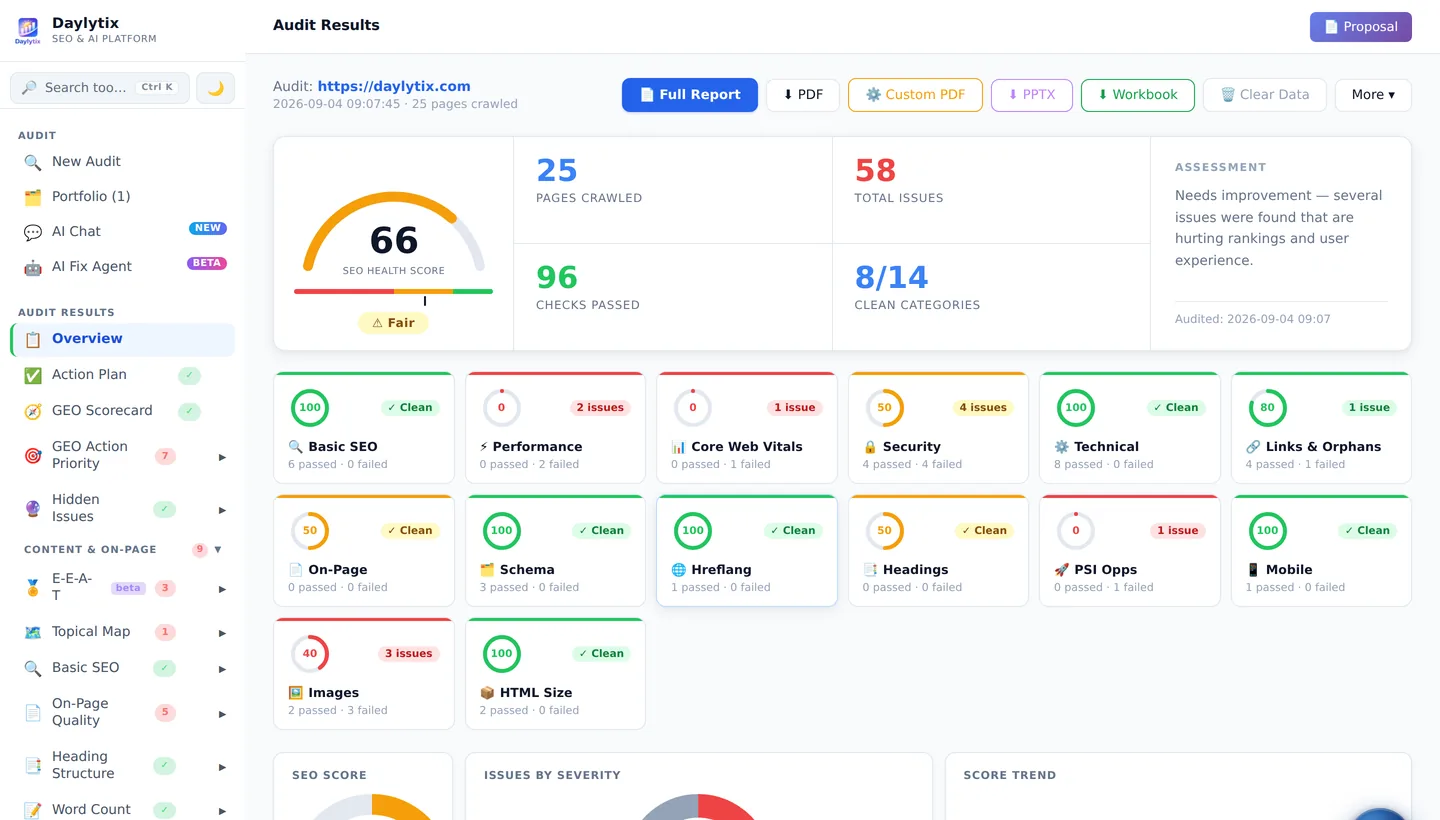
That is the gap Daylytix fills. It is not free: after a 7-day trial with no card, plans start at €9.99 a month. In one audit it runs 150+ checks across 67 report sections, pulls in Search Console and GA4 data, scores AI search readiness, prioritises the fixes and produces a PDF report, with scheduled monitoring between audits.
If you are comparing paid tools, see our guides to the best SEO audit tools and Screaming Frog alternatives.
Frequently asked questions
What is the best free SEO audit tool?
Google Search Console, because it is the only free source of what Google actually indexed. Pair it with a free crawler: Ahrefs Webmaster Tools for sites you own, or the free version of Screaming Frog for up to 500 URLs on any site.
Can I do my own SEO audit?
Yes. Check indexing in Search Console, crawl the site with a free crawler, review robots.txt and the sitemap, test speed with PageSpeed Insights, check on-page elements and structured data, then fix what blocks indexing first. The six-step plan above walks through it.
Is the Semrush site audit free?
Semrush offers a free SEO Checker that gives one quick snapshot of a site a day. Its full Site Audit, with complete crawls, history and scheduled audits, is part of its paid plans.
Can I get a free SEO audit report as a PDF?
Seomator’s free tool produces a PDF for one page without an account. For a full-site PDF report you usually need a paid tool or a trial; you can try Daylytix free for 7 days and download a full audit report.
Can ChatGPT do an SEO audit?
Not on its own. A chatbot cannot crawl your whole site, read your server responses or see your Search Console data, so it cannot find broken links, redirect chains or indexing problems. It is useful for explaining findings once a crawler has found them.
Is a free SEO audit enough?
For one small site you own, often yes, if you combine the right free tools and repeat the audit after changes. Paid tools save time when you have many pages, several sites or clients, or need regular monitoring and reports.