 Daylytix
A monthly SEO report is how you show, every month, that the retainer is worth paying. Done well, it answers the “what am I actually paying for?” question before the client asks it. Done badly, it’s a wall of screenshots nobody reads. This guide covers what to include, a section-by-section template you can copy, how to write it so non-technical clients actually read it, and how to stop building each one by hand.
What to include in a monthly SEO report
A strong report answers three questions a client actually cares about: Is it working? What did you do? What’s next? Everything else is supporting detail. Include:
- Executive summary. Three to five sentences at the top: the headline result, the biggest win, and the priority for next month. Many clients read little else, so make it count.
- Organic performance. Clicks, impressions, average position and top queries from Search Console, plus sessions and conversions from GA4. Always show the change versus last month, and versus the same month last year for seasonal businesses.
- Rankings. Movement on the keywords that matter to the business - what climbed, what slipped, and what’s newly ranking.
- Technical health. The site’s audit score and any critical issues found or fixed. This shows ongoing maintenance, not just content.
- Work completed. A short list of what you actually did - pages optimised, links built, issues fixed. Concrete, not vague.
- Next month’s plan. The two or three priorities you’ll focus on. This frames the retainer as forward-looking.
- Appendix. The full keyword tables, crawl data and technical detail. Most clients won’t open it, but it shows there is real work behind the summary.
A monthly SEO report template
Use the same structure every month so clients learn where to look. Here is a template you can copy into your own document or PDF, with an example line for each section:
- Cover page - client name, reporting period (for example “September 2026”), your agency name.
- Executive summary - “Organic clicks grew 14% versus August. Six product pages reached the top 10. Next month: fix the slow mobile category pages.”
- KPI scorecard - clicks, impressions, conversions and average position, each with the change versus last month and last year.
- Organic traffic over time - a 12-month line chart with a note where your work started.
- Keyword rankings - how many tracked keywords sit in positions 1-3, 4-10, 11-20 and beyond, plus the biggest movers.
- Top pages - the five pages that gained the most clicks this month, by name.
- Technical SEO health and Core Web Vitals - audit score, critical issues fixed, anything still open.
- Work completed this month - a short, plain-language list.
- Priorities for next month - two or three concrete actions.
- Appendix - full tables and technical detail.
Consistency matters more than length. A tight report delivered on the same day each month builds more trust than a sprawling thirty-page export nobody opens. Keep tables in the main report short (around 15 rows at most) and move anything bigger to the appendix.
Tip: Lead every section with the outcome, then the data - not the other way round. “Organic traffic grew 18% this month, driven by the three blog posts we optimised” lands far better than a chart the client has to interpret themselves.
A monthly SEO report example (PDF)
Here is what that structure looks like in a real report: three pages from the PDF Daylytix produced for its own site, daylytix.com, in October 2026. The cover carries the agency's name, website and tagline, the second page answers “how is the site doing?” at a glance, and the roadmap turns the findings into next month's work.
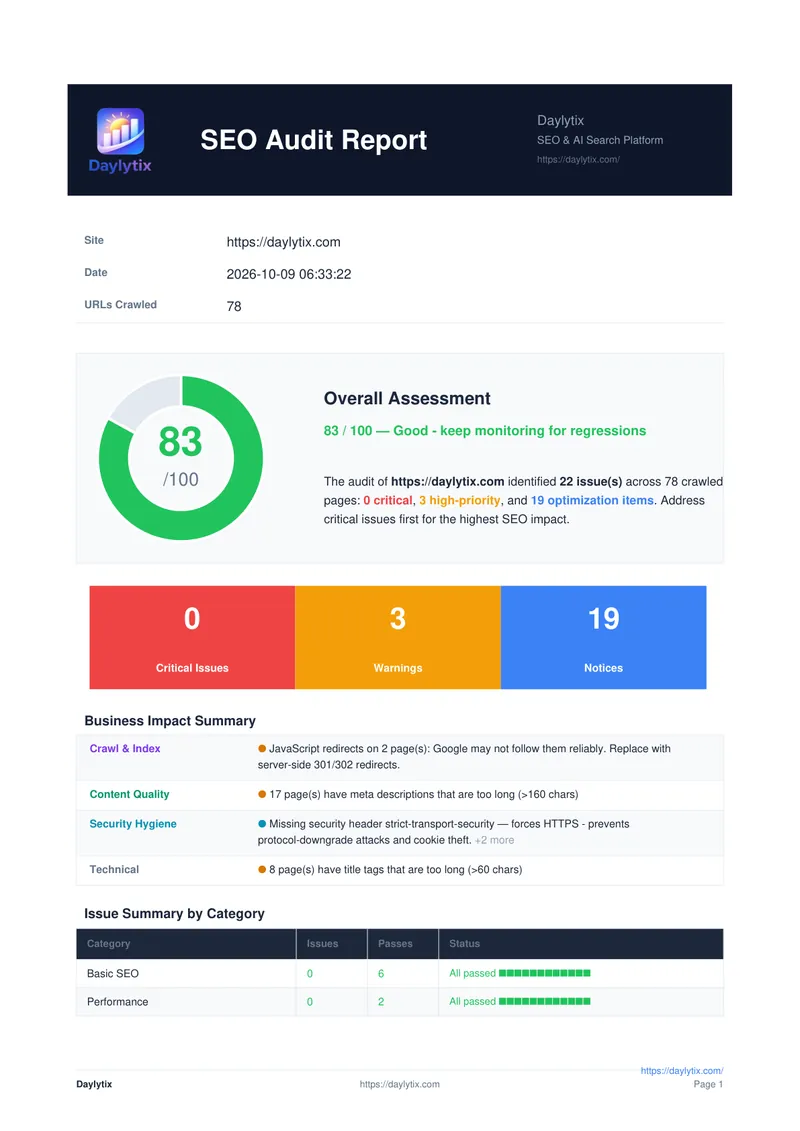
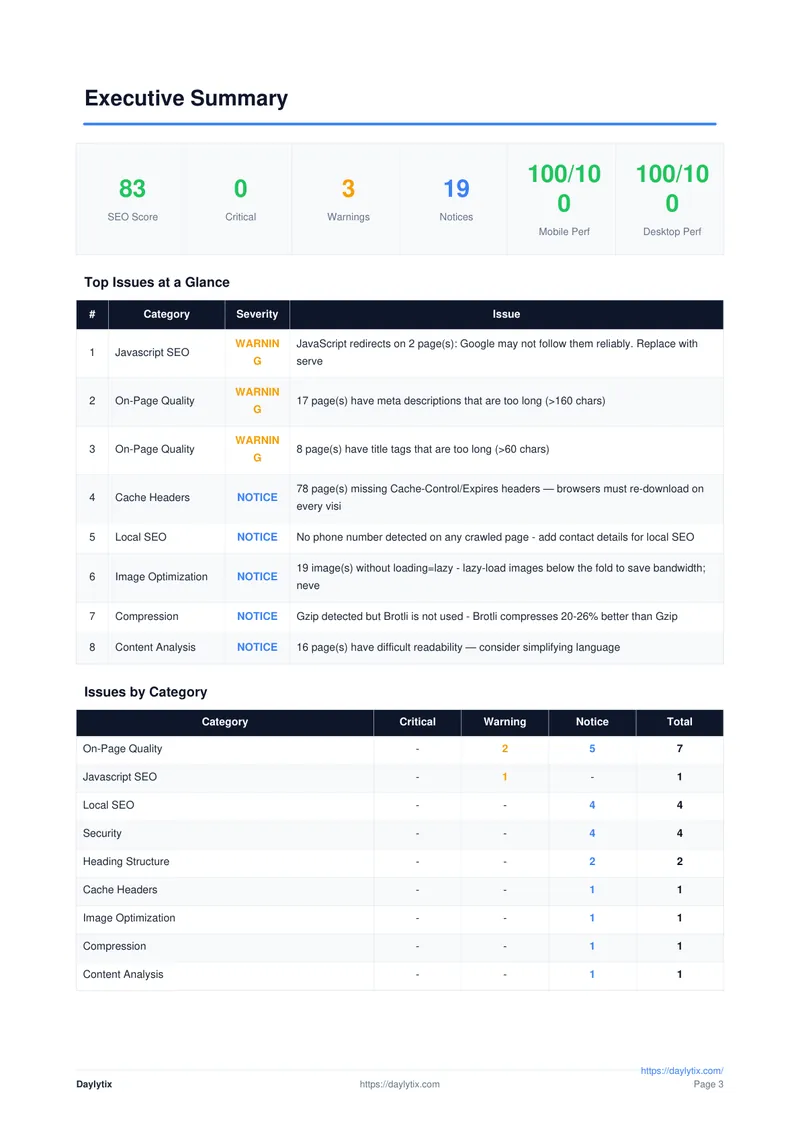
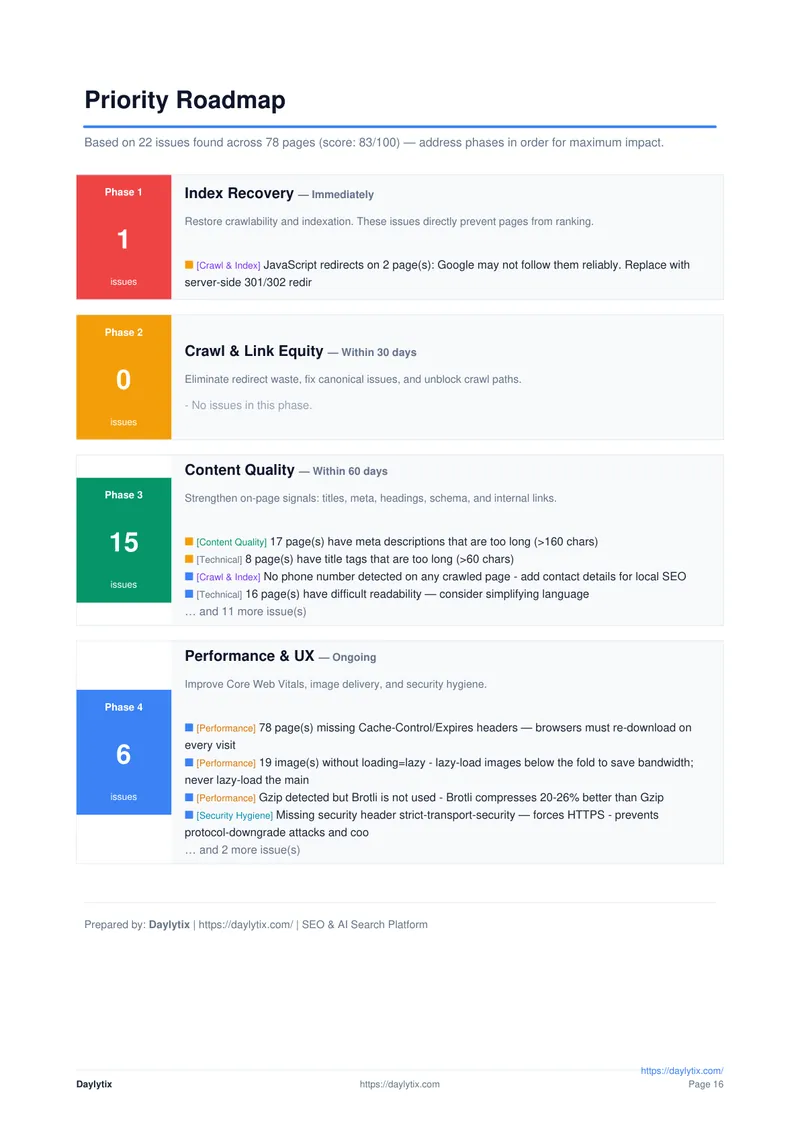
The full report runs to about 50 pages, because it also carries the detail: Search Console and GA4 data, Core Web Vitals, accessibility, structured data and AI search readiness. For a monthly client report, send the first few pages as the report and keep the rest as the appendix.
The 5-second test
Before you send a report, open it, look at the first page, and ask: could a non-technical person answer “are things better than last month?” within five seconds? If the answer needs scrolling, table-reading or knowing what LCP means, rewrite the first page. A single sentence - “Organic traffic grew 14% this month, driven by six pages entering the top 10” - says more than a 200-row position table.
Make it client-friendly, not a data dump
The most common reporting mistake is confusing thoroughness with value. Clients don’t want every metric - they want to know the work is paying off. Write in plain English and use a chart only when it makes a point faster than a sentence would. Each chart should answer one question.
Translating the jargon is most of the work. Some examples:
- “Canonical tag issues” becomes “14 pages were pointing Google at the wrong version of themselves - we fixed them.”
- “Crawl budget inefficiency” becomes “Google was spending time on unimportant filter pages instead of your products - we blocked them.”
- “Thin content on category pages” becomes “Your category pages don’t say enough for Google to understand them - we are adding intro copy to 8 of them.”
- “Core Web Vitals below threshold” becomes “Your site loads slowly on phones - we found 3 fixes and start on them this month.”
Frequency and format
Monthly reporting suits active retainers. For small maintenance accounts, a quarterly report can be enough and gives changes time to show in the data. For larger clients, a short one-pager plus a regular call often works better than a long monthly document.
A PDF is the most practical format: it looks finished, opens on any device, and the client can forward it to their manager. A shareable link works well for clients who want to look around themselves. Avoid sending a raw spreadsheet as the main deliverable - it says “here is data, figure it out” rather than “here is what it means.”
Monthly SEO dashboard or PDF? A live dashboard, for example in Looker Studio, is good for clients who check numbers often, but it only shows data; it does not say what changed or what you did about it. Many agencies use both: a dashboard for the numbers, and a short monthly PDF that tells the story and sets next month's priorities.
Brand it as your own
A report with your agency’s name and details on it reinforces that you are delivering the results; a report that looks like a generic tool export undercuts the premium you’re charging. Most reporting tools let you add your agency’s details, and some also let you replace their logo with yours - full white-label. Check which one a tool offers before you rely on it.
Use a monthly SEO report generator
Assembling a report manually every month - exporting rankings, screenshotting charts, formatting slides - is hours you could spend on the actual work, multiplied by every client. The scalable approach is to generate the report straight from the audit data: run the audit, and a finished PDF or PowerPoint comes out the other side.
In Daylytix the monthly routine looks like this:
- Connect the data once. Sign in with Google so each audit pulls the client’s Search Console and GA4 figures.
- Set your branding once. Your agency name, website, tagline and report footer go on every PDF, on every plan. See Report branding.
- Schedule the audit monthly. Pick the day, and the PDF is emailed to the client after each run through your own SMTP mail settings.
- Show progress. Compare this month’s audit with last month’s to list what was fixed and what is new, and add that to your summary.
PowerPoint export is included in Pro and Agency for clients who prefer slides. See white-label SEO reports for what goes into each format.
Frequently asked questions
What should a monthly SEO report include?
An executive summary, organic traffic and conversions (with month-over-month change), keyword rankings, technical health, the work you completed, next month’s priorities, and an appendix with the full data. Lead with outcomes, keep it consistent, and brand it.
Is there a monthly SEO report template I can use?
Yes. Use this order: cover page, executive summary, KPI scorecard, traffic over 12 months, keyword rankings, top pages, technical health, work completed, next month’s priorities, appendix. Keep the same order every month so clients know where to look.
How long should an SEO report be?
Long enough to answer “is it working, what did you do, what’s next” and no longer. A focused five to eight pages delivered on time beats a thirty-page data dump nobody reads.
Should I send the report as a PDF?
For most clients, yes. A PDF looks finished, opens anywhere and is easy to forward internally. Add a shareable link if the client likes to explore the data, and keep raw spreadsheets for the appendix.
How do I make SEO reports faster?
Generate them from your audit data instead of building each by hand. Tools like Daylytix produce a PDF or PowerPoint from a completed audit in one click and can email the PDF on a schedule.
Where can I see a monthly SEO report PDF example?
The pages above come from a real Daylytix PDF report for daylytix.com: the cover, the executive summary and the priority roadmap. Most monthly reports follow the same order: summary first, then traffic and rankings, technical health, work done and next steps.
Is there a free monthly SEO report generator?
Google’s Looker Studio is free and can show Search Console and GA4 data in a dashboard, but you build and explain it yourself. Report generators that also audit the site and write the PDF are usually paid; Daylytix has a 7-day free trial with no card.