 Daylytix
The Prompt Tracker asks AI assistants the questions your customers ask and records whether the answers mention your brand, where in the answer, which competitors they name and which pages they cite. ChatGPT, Gemini, Google AI Overviews and Google AI Mode are read as their users see them, through your own DataForSEO account. It is available on every plan; DataForSEO bills you for each answer.
Before you start
- Save your DataForSEO Login and DataForSEO Password in App Settings → Backlinks, under Backlink APIs.
- Open the tool from Rankings & Visibility → AI Visibility in the sidebar, or with Ctrl+K (Cmd+K on a Mac) and AI Visibility. The panel itself is titled Prompt Tracker.
Setting up your brand and prompts
- In Brand Config, fill in Brand / Company Name (needed for every run), Your Domain (to spot your own pages among the citations), Competitors and Topics, comma-separated, and click Save Config.
- On the Prompts tab, type a prompt, pick its type (Auto-detect type, Non-branded, Comparison or Branded), optionally a topic, and click + Add.
- Or click AI Generate Prompts to write 20 prompts from your Topics. This step uses your own Gemini or Anthropic key from Your AI key, and prompts you already have are skipped.
An answer counts as a mention when it contains your brand name exactly as you typed it, in any letter case, so use the name people and AI answers really use. Competitors work the same way, and only the ones on your list are counted.
Write prompts the way customers ask, for example “best dentist in Bristol”. Non-branded prompts tell you the most, because the brand is not in the question. Auto-detect marks a prompt as branded when it contains your brand name, and as a comparison when it says vs, versus, compare or alternative.
Engines
| Group | Engines | Per answer |
|---|---|---|
| As users see them | ChatGPT, Gemini, Google AI Overviews, Google AI Mode | about $0.004 each |
| API answers with web search | Claude (API), Perplexity (API) | about $0.03 and $0.007, varying with answer length |
| Direct API with your own keys | Claude, Gemini, ChatGPT and Perplexity Sonar, without the apps | billed by your AI provider |
Prices are DataForSEO’s in October 2026. The first group is the closest to what people really see. The API answers come from the model with web search, close to the app but not the same. The direct API engines answer without web search, so their answers differ most from what users see. An engine that is not connected shows (connect in Settings).
Runs per prompt, country and cost
AI answers change from one ask to the next, so each prompt is asked several times. Set Runs per prompt from 1 to 50 (default 5). The confidence label follows the number of runs: 5 or more is low, 10 or more medium, 30 or more high.
Pick the Country (30 countries); it fills in the Language, which you can change. Below the settings, a line shows what the run will cost: One run asks N questions, about $X from your DataForSEO balance. For example, 20 prompts in ChatGPT, Gemini and AI Overviews at 5 runs each is 300 questions, about $1.20.
One run can ask at most 600 questions (prompts x engines x runs). Click Run All Prompts on the Run & Results tab; from $0.50 up, you are asked to confirm the cost first.
Reading the results
The cards at the top show Overall Visibility, Non-Branded visibility, Comparison visibility and Avg Brand Rank. The table has one row per prompt and engine:
| Column | Meaning |
|---|---|
| Visibility % | The share of runs whose answer names your brand. |
| Mentions/Runs | How many answers named you, out of the runs. |
| Avg Rank | Where your brand came in the answer compared with the competitors it named, 1 being first. |
| Top Competitors | The competitors from your list named for that prompt. |
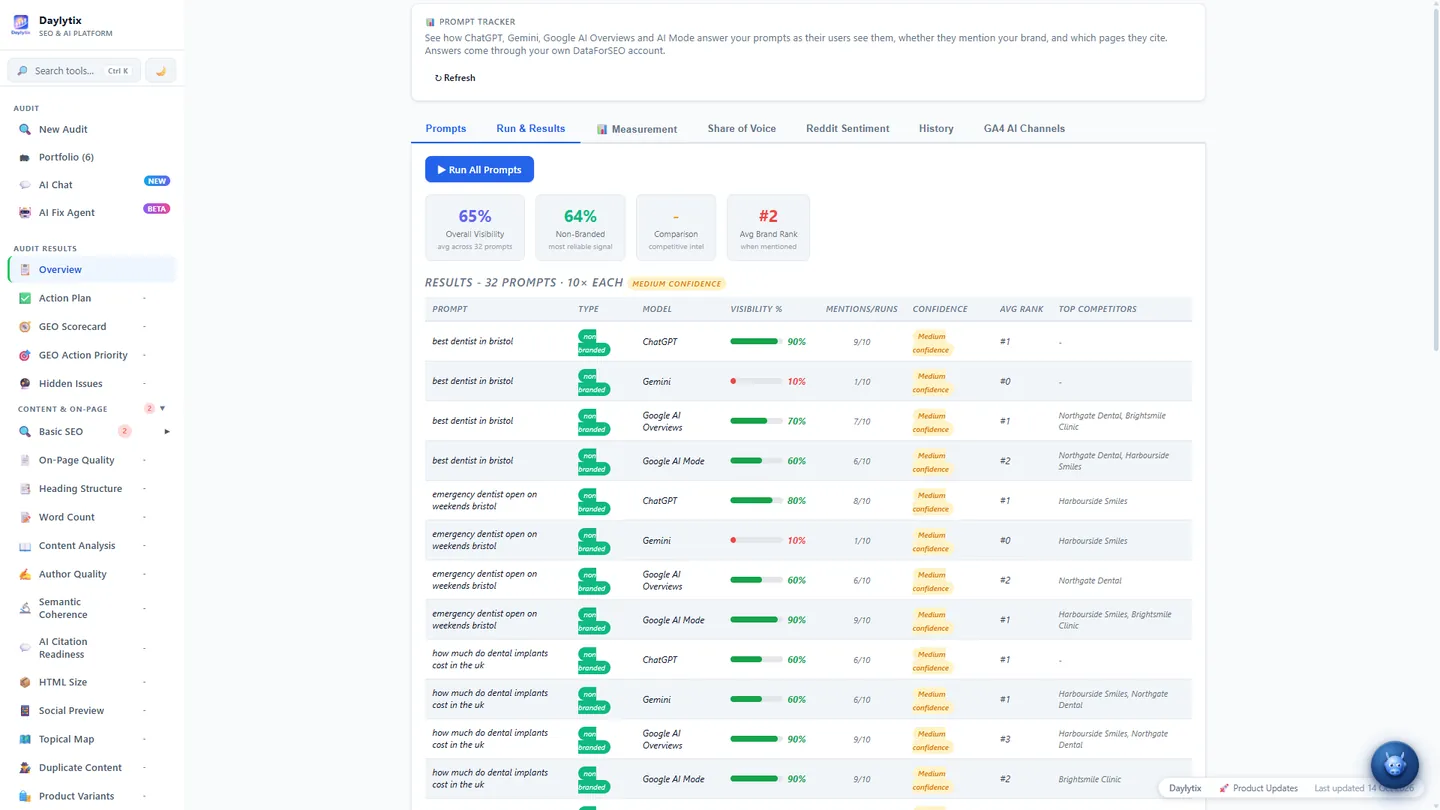
Google does not show an AI Overview or AI Mode answer for every search. When it shows none, that run counts as not mentioned, and the row notes how many times an answer was shown.
Cited Sources lists your own pages that AI answers cited, with how often, in which engines and for how many prompts (hover to see the prompts), followed by the most-cited domains. Tracking parameters such as utm_source are removed, and subdomains count as your domain.
Share of voice
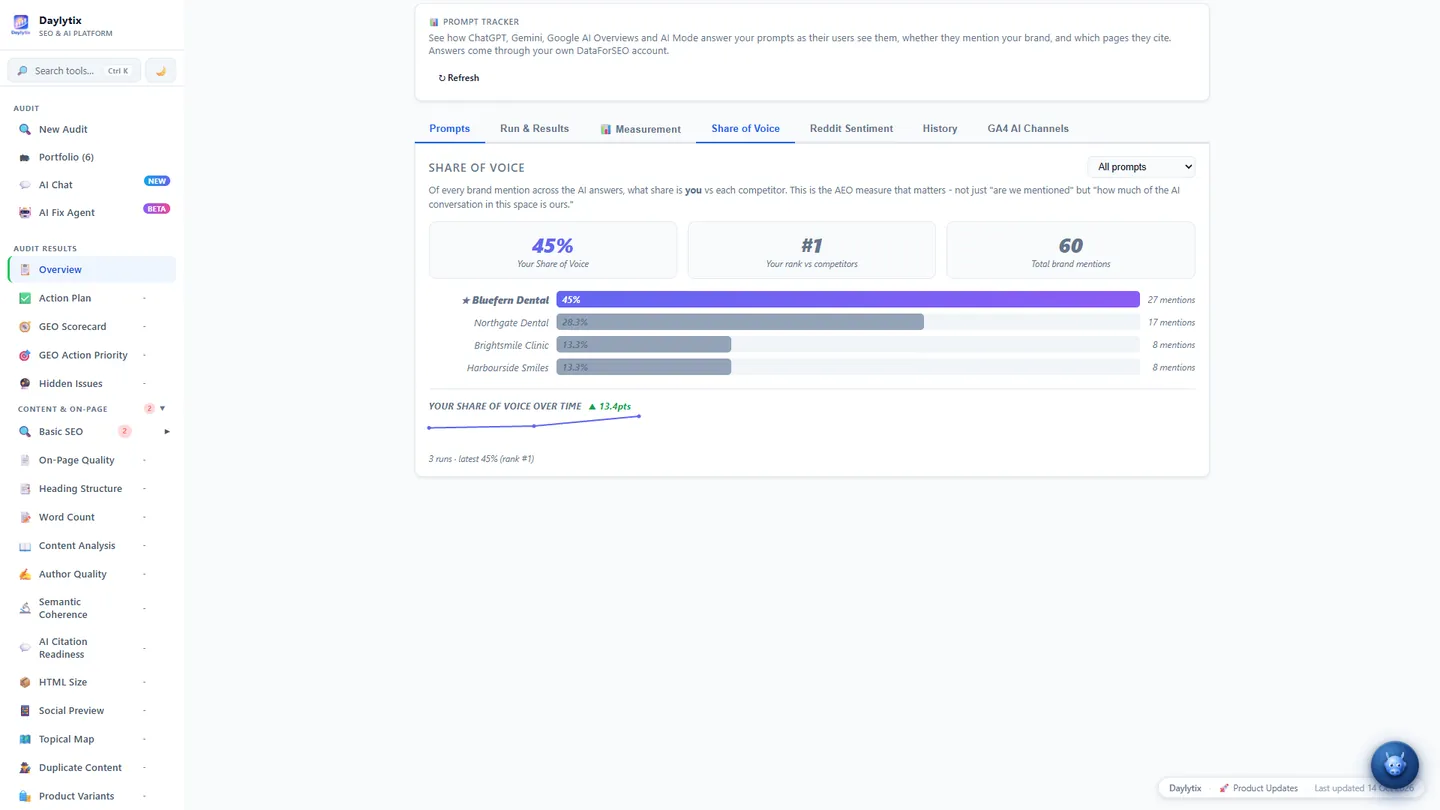
The Share of Voice tab counts each answer that names your brand or a competitor from your list, and shows your share against each competitor, your rank among them, and how your share moves from run to run. Filter it to non-branded, comparison or branded prompts. The Measurement tab adds the tone of the words around your brand and the strengths and concerns the answers mention.
Schedules and history
Under Run automatically, choose Daily, Weekly or Monthly. The first run comes one interval after you set the schedule, and the panel shows the next run time. Each scheduled run costs the same as a manual one.
The History tab lists your last 20 runs with their cost and visibility; click one to open it in Run & Results. Connected AI assistants can also read your latest run over MCP.
Troubleshooting
| Message or problem | What to do |
|---|---|
| An engine needs the DataForSEO login | Save the login in App Settings → Backlinks. |
| Set brand_name in Prompt Tracker config first | Fill in Brand / Company Name and click Save Config. |
| The limit is 600 | Use fewer prompts, engines or runs per prompt in one run. |
| Every row shows 0% | Check your DataForSEO balance and login: when every answer fails, the run is still saved with 0%. |
| A scheduled run did not happen | A schedule skips the run when the brand name, prompts, engines or DataForSEO login are missing. |
Next: Project memory.