 Daylytix
Daylytix tracks keyword positions in two ways. The Rank Tracker tab inside every audit builds itself from your Google Search Console data, with nothing to set up beyond the connection. The Rank Tracker tool in the sidebar checks the keywords you choose in Google's live results, through your own DataForSEO account. Both are available on every plan.
The Rank Tracker tab in an audit
Open any audit and find Rank Tracker under Data Sources. It needs Search Console connected for the audited site; without it the tab stays empty. See Connecting Google Search Console.
The tab does not ask you for a keyword list. It takes them from Search Console:
- your top 25 queries by clicks over the last 28 days, and
- your top 25 queries by clicks over the last 14 days,
- combined into one list of up to 50 keywords.
The position shown is Search Console's average position for that query in the period, not a live check of today's results. Keywords that come only from the 14-day list show their 14-day clicks and no impressions or CTR.
How changes are calculated
Each audit is compared with your earlier audits of the same site. The tracker keeps up to 12 earlier audit dates plus the current one, so a keyword can have up to 13 points of history. Several audits on the same day count as one.
| Label | Meaning |
|---|---|
| Improved | The average position got better by 0.5 or more since the previous audit. |
| Declined | The average position got worse by 0.5 or more. |
| Stable | The position moved by less than 0.5 either way. |
| New | The keyword was not in the previous audit's top 25. |
| Lost | The keyword was in the previous audit's top 25 and is not now. It may still rank; it no longer brings enough clicks to make the list. |
Alerts
The tab flags keywords that dropped since the previous audit:
| Alert | When it fires |
|---|---|
| Critical | The keyword fell 5 or more positions and has at least 5 clicks, or it fell off page 1. |
| Warning | The keyword fell at least 3 but less than 5 positions and has at least 5 clicks. |
| Lost keyword | One of the top 5 lost keywords had at least 3 clicks in the previous audit. |
These alerts are shown in the tab. They are not emailed; for email or Slack alerts on a site, set up a scheduled audit.
Run Check
The Run Check button at the top of the tab re-runs just this section: it crawls up to 30 pages, fetches fresh Search Console data and rebuilds the tracker against your saved audits. The result is shown in your browser only and is not saved into the audit. To keep a new snapshot in the history, run a new audit.
The Rank Tracker tool in the sidebar
The sidebar tool (Rankings & Visibility → Rank Tracker) checks keywords you add yourself in Google's live results, for the country you choose. It runs on your own DataForSEO account, so each check is billed to you by DataForSEO, not by Daylytix.
- In Settings → Backlinks, under Backlink APIs, enter your DataForSEO Login and DataForSEO Password and click Save Settings.
- In the tool, type the Domain and click Load.
- Pick the Google country. It starts from the domain's ending (for example Germany for .de, the United States for .com) and is remembered for that domain after a check.
- Add keywords one at a time with + Add, or several at once with Bulk (one per line, then + Add All).
- Click Check Rankings and confirm. The confirmation shows how many keywords will be checked and in which country.
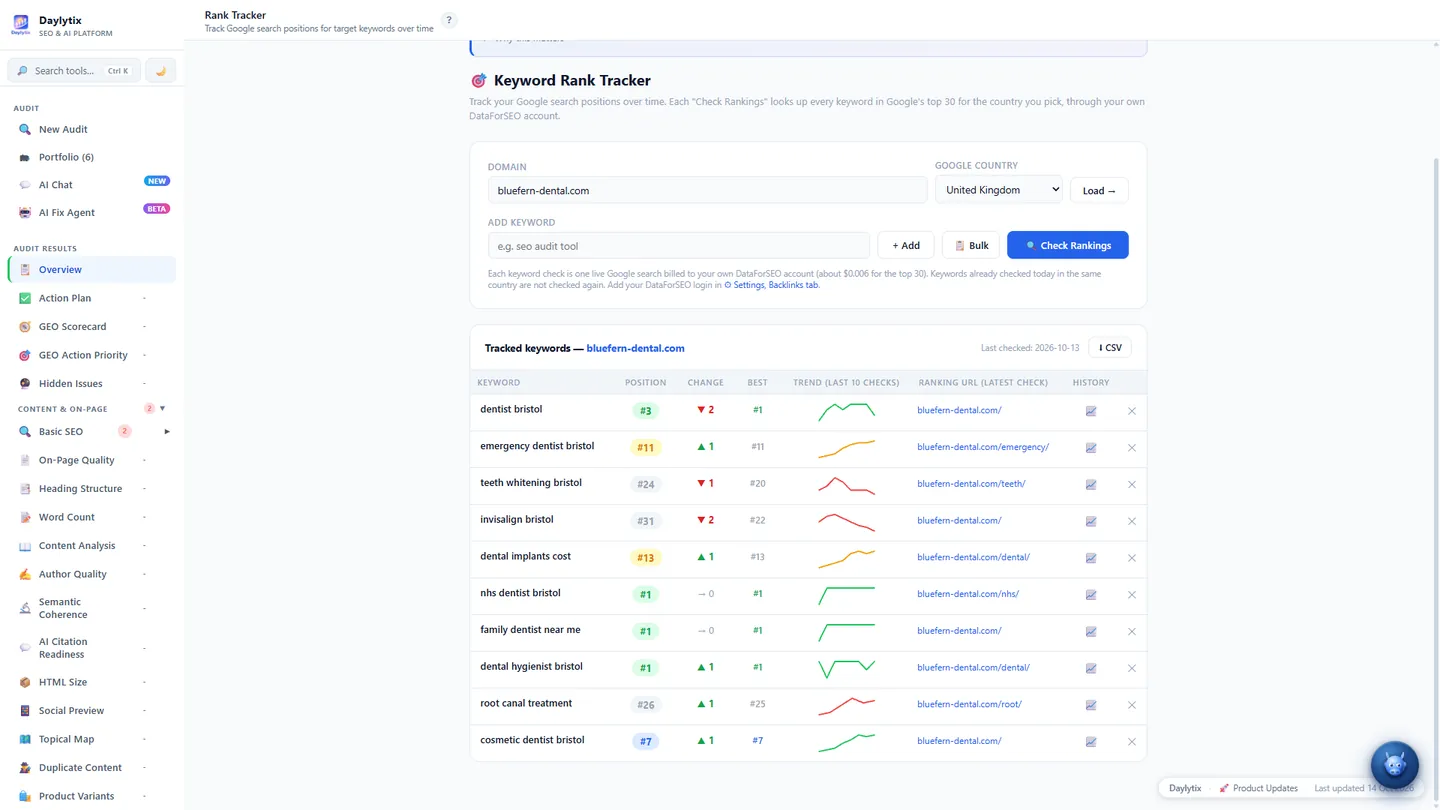
Each keyword is looked up in Google's top 30 organic results on desktop. The position is the first organic result on your domain or one of its subdomains; ads, featured snippets and other boxes are not counted. If none is found, the keyword shows Not in top 30.
Each keyword check is one live search on your DataForSEO account. At DataForSEO's live price in October 2026 that is about $0.006 per keyword for the top 30. A keyword already checked today in the same country is not checked again, so a second click the same day costs nothing. If the login is missing or wrong, or the balance is empty, the tool says so and stops after the first keyword.
Checks run only when you click the button; there is no automatic daily check. One result per keyword per day is kept, for the last 90 checks. The list exports with CSV.
Requirements and limitations
- The audit tab needs Search Console access to the property. Its positions are averages, so they can differ from what you see in a single search.
- Search Console only reports queries that brought impressions, and hides some rare queries for privacy.
- Only your top queries by clicks are tracked in the tab. For a specific keyword list, use the sidebar tool; it needs your own DataForSEO account.
Next: Reading keyword position changes.